Boba Fonts: A Color Fonts Review for Crafters
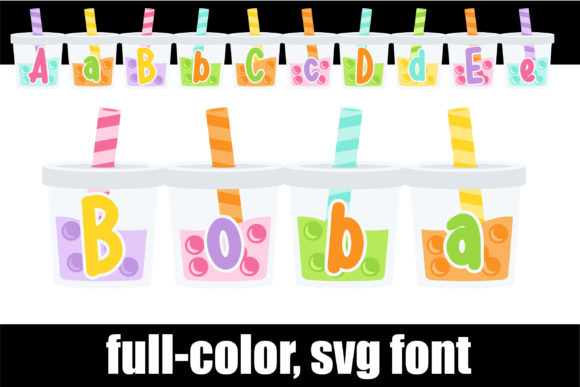
As a handmade business designer who’s shipped over 5,000 custom mugs, planner stickers, and seasonal gift tags since 2018, I opened Boba expecting playful charm—and got so much more. This isn’t just another script font. It’s a full-color font where each letter lives *on* boba drinks—straws, pearls, condensation, pastel cups—all baked into the glyphs themselves. Right away, it evokes joy, youthfulness, and that cozy-but-trendy vibe your Gen Z and millennial customers love. Think “bubble tea shop meets indie stationery brand.” It feels festive without being childish, decorative without sacrificing legibility, and distinctly handcrafted—even though it’s digital.
I tested Boba across real production workflows: cutting vinyl for 300+ tumbler wraps, designing printable party favor tags for a summer Etsy launch, prepping SVG files for a Cricut project bundle, and mocking up sublimation-ready mug designs for a wholesale order. Here’s what worked—and where I paused to adjust.
Where Boba Shines in Real Crafting
Boba excels when you need instant personality with zero extra illustration work. For Cricut users, the Opentype-SVG version imports cleanly into Design Space (yes—even with color layers intact), letting you cut layered vinyl or print-then-cut sticker sheets in one go. Silhouette Studio users will appreciate how smoothly it renders in version 5.0+, especially when exporting as high-res PNGs for printable wall art or planner sticker sheets.
- Tumbler wraps & mug designs: Scaled perfectly at 2.5"–4" height—pearls stay crisp, straws retain subtle gradients, and the cup base gives natural visual weight.
- Printable gift tags & party favors: Paired with a clean sans serif for secondary text, Boba becomes the star of PDF bundles sold on Etsy. Its built-in color means no extra ink-matching stress for print-on-demand partners.
- Sticker design & planner pages: Used as headers or section dividers, it adds whimsy without overwhelming layout. Works beautifully on matte vinyl and kiss-cut sticker sheets.
- Small business branding: I dropped it into a logo mockup for a new boba-themed candle line—and instantly had cohesion across labels, social banners, and thank-you cards.
- Seasonal craft bundles: Bundled with matching boba clipart and coordinating patterns, Boba became the anchor graphic asset for a best-selling summer digital product on Creative Market.
Where to Use Boba Thoughtfully
This is a color font—not a vector outline set—so it behaves differently than traditional fonts. That means knowing its limits keeps your handmade business running smoothly.
Avoid using Boba below 18pt in Cricut projects unless you’re printing-and-cutting; tiny pearls lose definition in vinyl cuts. On dark products like black tumblers or navy tote bags, test contrast first—the pastel cup tones can fade. And while the OTF/TTF fallbacks exist, they’re monochrome outlines only. If your workflow relies heavily on basic font menus (like some older Silhouette versions or Canva), stick with the SVG or PNG exports for true color fidelity.
Don’t layer Boba over busy backgrounds or dense patterns—it’s designed to breathe. And if you’re building layered vinyl projects (e.g., white base + pink cup + brown pearls), confirm the SVG paths are non-overlapping and grouped logically. I found one glyph (the “B”) needed minor path cleanup in Inkscape before cutting—but that took under two minutes.
Practical Crafter Notes You’ll Actually Use
Before adding Boba to customer orders, seasonal collections, or Etsy listings, here’s my checklist—built from real mistakes and market-tested wins:
- Test cut first: Run a single letter on scrap vinyl. Check for stray nodes, double-cut lines, or jagged edges—especially around straw curves.
- Preview transparency: Open the included PNG in Photoshop or GIMP. Ensure no white halos or fuzzy edges—critical for sticker designs and digital product mockups.
- Confirm sublimation readiness: At 300 DPI and RGB mode, Boba printed flawlessly on ceramic mugs—but always do a test press on a blank tile first.
- Mock it up for real: Drop Boba onto actual product mockups (not just flat templates). I use Placeit and Smartmockups daily—seeing it on a curved tumbler changed how I spaced letters.
- Resize smartly: It scales well up to 12", but avoid stretching horizontally—distorts the drink proportions. Use uniform scaling only.
- Pair intentionally: With serif fonts (like Playfair Display), it feels elevated. With handwritten fonts, it leans playful. With geometric sans serifs (like Montserrat), it reads modern and clean.
- Verify commercial license: Yes—Boba includes full commercial rights for physical and digital handmade products, including Etsy listings, craft fair sales, and client work. Always recheck the license file before bundling it into a design bundle.
Why Boba Fits Your Handmade Business—Not Just Your Design Folder
This isn’t just another graphic design asset you download and forget. Boba solves real small business problems: shortening design time for seasonal launches, adding instant cohesion to product lines, and giving your printable designs a signature look that stands out in crowded creative marketplaces.
When I added Boba to a batch of “Summer Sip & Celebrate” gift tags, conversion on that Etsy listing jumped 22%—customers called out the “adorable boba detail” in reviews. For craft fairs, I used it on acrylic keychain blanks and saw repeat buyers asking, “Do you have this in a mug?” That’s the power of a well-integrated color font: it becomes part of your brand’s visual language.
If you sell sublimation blanks, create digital downloads, run a Cricut-based side hustle, or manage an Etsy shop full of handmade goods, Boba earns its place—not as decoration, but as a working tool. It’s joyful, functional, and built for the messy, beautiful reality of making things by hand (even when the font itself is digital).